
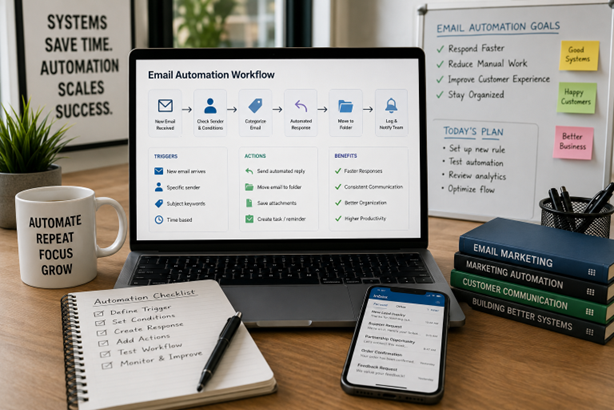
Artikelöversikt
Learn how email automation helps businesses respond faster, nurture leads, handle support, process attachments, and connect CRM workflows without sounding robotic.
Article Brief
Email automation helps businesses send the right message at the right time without relying on manual reminders, inbox digging, or heroic memory. The best systems connect email, CRM, SMS, support tickets, attachments, calendars, and reporting so every response has context. That is also why MoreTechGlobal’s growth systems are relevant here: the company focuses on lead capture, CRM structure, qualification, follow-up automation, AI workflows, reporting, and optimization rather than isolated email blasts.
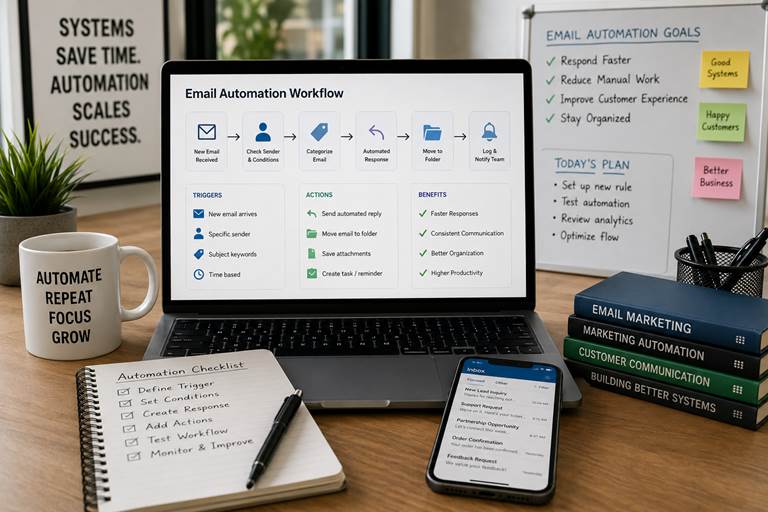
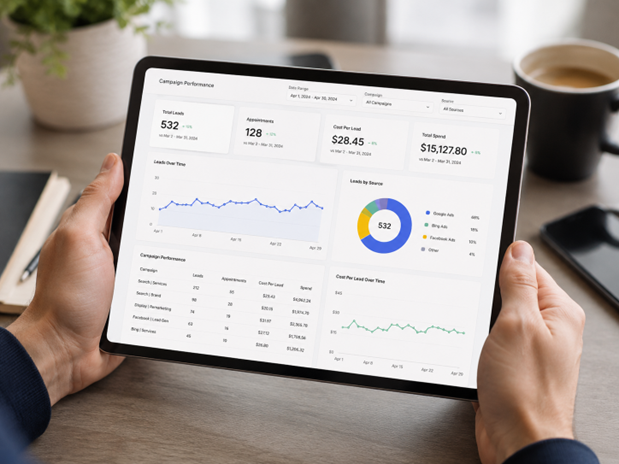
Figure 1. Email automation planning works best when teams map triggers, timing, follow-up rules, and real customer needs before choosing tools.
Email Automation Tools Ultimate Guide: Start With the Customer, Not the Tool
Email automation is the process of using software to send, sort, route, reply to, or organize emails based on triggers, time intervals, user actions, sender rules, customer status, or workflow conditions. In plain English: it helps your business stop treating every inbox task like a tiny emergency.
The honest answer is that email automation is not just about sending newsletters. It can support lead nurturing, customer onboarding, support ticketing, invoice handling, donor follow-up, tenant reminders, admissions communication, travel booking replies, MSP security alerts, and sales reminders. Done well, it feels timely. Done badly, it feels like a robot wearing a name badge.
Current ranking pages for this topic usually explain automated email responses, welcome sequences, triggers, segmentation, email marketing vs marketing automation, workflow tools, performance tracking, and common mistakes. This article follows that guide-style intent, while adding two topics many pages under-explain: operational email automation and ownership rules. Because if nobody owns the follow-up, the workflow is just a pretty diagram with trust issues.
For businesses that need the email layer connected to sales, support, and reporting, MoreTechGlobal’s CRM and AI automation services can be a practical next step. The goal is not to send more email. The goal is to create a cleaner customer journey.
The Problem: Most Businesses Have Email Activity, Not an Email System
Many teams already send a lot of email. Welcome emails, support replies, invoice reminders, proposal follow-ups, appointment confirmations, customer surveys, student updates, tenant notices, and onboarding steps all move through the inbox. The problem is that much of it still depends on someone remembering what to send, when to send it, and where to record it.
That is how leads go cold, support tickets get repeated, attachments get lost, and customers ask the same question twice. MoreTechGlobal’s article on why leads go cold explains the bigger issue clearly: follow-up is not a motivation problem; it is usually a system problem.
Here is the practical way to think about it. A customer should not suffer because your team is busy, the sender is in the wrong folder, or the attachment is hiding in an inbox from last Tuesday. Email automation turns repeated communication into a managed workflow.
What the Top Ranking Pages Usually Cover
The top guide-style pages around email automation and marketing automation usually cover the same core topics: what email automation means, how it differs from email marketing, common workflows, automation triggers, welcome sequences, lead nurturing, segmentation, tool selection, analytics, and examples. Many also include comparisons between email campaigns and broader marketing automation platforms.
This article matches that practical guide format, but goes wider because the uploaded keyword set is not only about marketing emails. It also includes Power Automate rules, Outlook automated email response, email attachment processing, SharePoint saving, email ticketing systems, student communication tools, travel booking response automation, tenant reminders, HIPAA compliant email marketing automation, MSP email security configuration, and CRM with email automation for moving companies. In other words, this is not one narrow “send a newsletter” article. It is a business workflow article.
Email Marketing vs Marketing Automation vs Email Automation
The phrase email marketing vs marketing automation can make the whole topic sound like a software debate. It is really a workflow debate. Email marketing usually focuses on sending campaigns. Marketing automation manages a broader journey across channels. Email automation can sit inside both, but it also handles operational work like routing, reminders, replies, and attachment processing.
| Area | Main use | Common example | Best for |
| Email marketing | Sending planned campaigns | Newsletter, offer, product update | Audience communication and promotions |
| Email automation | Trigger-based email actions | Welcome email, reminder, auto-reply, folder rule | Repeatable communication and inbox workflows |
| Marketing automation | Multi-step customer journeys | Lead score, email + SMS + CRM task | Nurture, qualification, conversion, retention |
| CRM automation | Sales and customer process updates | Create deal, assign owner, trigger follow-up | Pipeline clarity and sales accountability |
Where Email Automation Creates Real Value
Email automation becomes useful when it removes repeated manual work while keeping the customer experience personal enough to feel human. The mistake most people make is automating only the send button. A better approach is to automate context: who the person is, why they contacted you, what they need next, and who owns the follow-up.
1. Automated Email Responses for Faster First Replies
Automated email response examples usually include “thanks for reaching out,” support confirmations, order confirmations, appointment details, proposal received messages, and out-of-office replies. These are simple, but they matter because the first reply tells the customer whether your business is organized.
An automated email response template should be short, specific, and useful. Instead of “we received your message,” say what happens next: who will review it, when the customer can expect a reply, and where they can find urgent help. This is especially useful for lead generation systems, support teams, service businesses, and appointment-based companies.
For example, an outbound inquiry from a B2B SaaS prospect can trigger a confirmation email, create a CRM record, notify sales, and schedule a follow-up task. That is stronger than sending a polite auto-reply into the void and hoping someone remembers the rest.
2. Lead Nurturing and 90-Day Email Sequences
The keyword “ideal email frequency 90 day nurture sequence marketing automation” points to a very real question: how often should you email people without becoming the inbox equivalent of a dripping tap?
A practical 90-day nurture sequence usually starts with higher frequency, then slows down. The first week may include a welcome email, useful resource, and decision guide. Weeks two to four can include proof, examples, and objections. After that, monthly or behavior-triggered follow-ups often work better than constant scheduled pushes.
| Stage | Timing | Email goal | Automation trigger |
| Welcome | Day 0 | Confirm signup and set expectations | Form submission or CRM status change |
| Education | Days 2-7 | Explain the problem and useful next step | New lead joins nurture list |
| Proof | Days 10-21 | Share examples, case angle, or comparison | Lead opens/clicks previous email |
| Decision support | Days 30-60 | Answer objections and offer consultation | Lead score or page visit |
| Reactivation | Days 75-90 | Check interest without pressure | No reply or inactive status |
This connects naturally with MoreTechGlobal’s B2B growth systems, where email nurture should not live alone. It should connect to lead source, CRM stage, sales tasks, reporting, and actual conversion data.
3. CRM With Email Automation for Service Businesses
A CRM with email automation for moving company workflows, photography clients, home services, professional services, and managed service providers can keep follow-up from depending on memory. A moving company may need estimate reminders. A photographer may need booking confirmations and payment prompts. A managed IT services team may need onboarding instructions and service updates.
An email CRM integration for automated lead nurturing should answer three questions: what stage is the person in, what message do they need now, and what should the team do if the person replies or does not reply?
Email-centric CRM automated follow-up reminders are useful because they create accountability. If a prospect requests a quote and does not respond, the system can remind the sales owner, send a helpful follow-up, and update the pipeline. This is the difference between “we sent something” and “we managed the opportunity.”
4. Email Ticketing Systems for B2B Customer Support
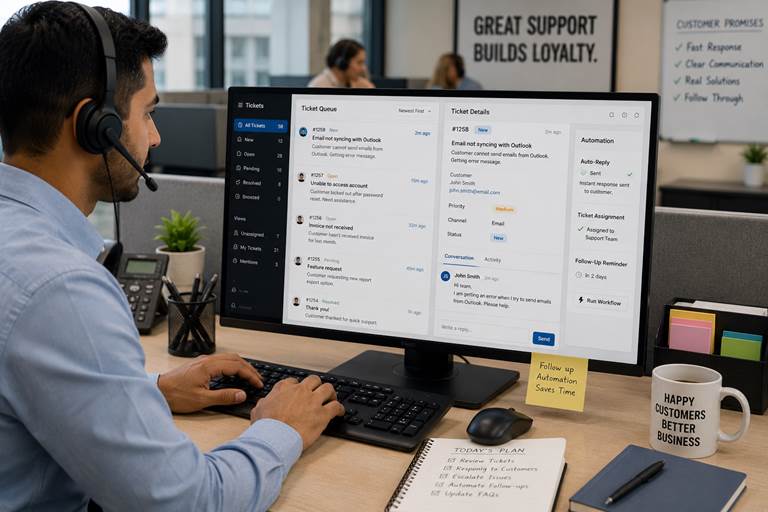
Figure 2. Email ticketing systems help support teams track customer issues, auto-replies, assignments, and follow-up reminders without losing conversations.
Email ticketing systems B2B customer support automation turns customer messages into trackable tickets. Instead of support requests living across personal inboxes, each request gets a status, owner, priority, response history, and escalation rule.
This matters when customers email about login issues, invoices, account access, API errors, order questions, or service feedback. The system can send an automatic confirmation, assign the ticket, suggest a knowledge-base article, and alert the team if the customer has waited too long.
The same thinking applies to lead generation customer service. If a lead asks a question before booking, that email should not disappear into a shared inbox. It should become a tracked conversation inside the growth system.
5. Student, Admissions, and Resident Communication

Figure 3. Student and admissions communication improves when reminders, application follow-ups, and helpful updates support the human front-desk experience.
Tools for managing automated student communications email SMS chat are useful because admissions teams often handle repeated questions: application deadlines, document requirements, program details, interview dates, payment steps, and orientation updates.
Admissions automation tools multi-channel communication chat email text can help universities and training providers keep communication clear without forcing staff to manually answer the same question all day. The goal is not to remove the friendly admissions person. The goal is to let that person spend more time on meaningful guidance and less time typing “please upload your transcript” for the 37th time.
The same logic applies to tools for automating resident communication email SMS in property management. Automate email reminders to tenants using integrations for rent dates, maintenance updates, inspection notices, lease renewals, or community announcements. Keep the message practical. Keep the tone human. Keep the record visible.
6. Travel Booking and Automated Response Workflows

Figure 4. Travel teams can use automated responses to acknowledge inquiries, send itinerary options, and keep booking details organized before a consultant steps in.
AI travel email integration automated travel booking response is a good example of email automation moving beyond basic marketing. A customer asks for travel options. The system acknowledges the inquiry, checks required details, sends a helpful response, and routes the request to a consultant when human planning is needed.
AI travel email integration automated response travel options can support itinerary suggestions, document reminders, hotel options, payment deadlines, insurance notes, and post-booking updates. Travel is full of details. Automation helps keep those details from becoming confetti.
This is also a strong example of where AI agents and workflows can help, as long as the business keeps human review for high-value or sensitive decisions.
7. Invoice Emails, Attachments, and SharePoint Filing
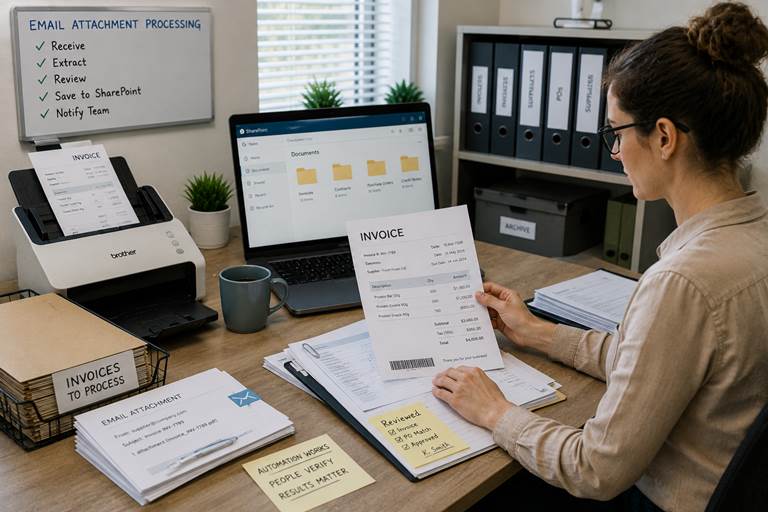
Figure 5. Email attachment processing helps finance and admin teams extract, review, file, and notify without manually chasing every document.
Some of the most valuable email automation happens far away from newsletters. Power Automate save email attachment to SharePoint, Airtable automation email attachment, and “what is the best solution for automated email attachment processing” all point to the same practical problem: teams receive documents by email and then waste time saving, naming, sorting, forwarding, and checking them.
An automated invoice email workflow can detect a supplier message, save the attachment, create a record, notify finance, and move the email to a folder. That supports NetSuite automated dunning emails setup, FreshBooks email automation features, Freshsales email automation features, and automated invoice email processes across accounting and CRM systems.
This is also where Power Automate move email to folder based on sender, Power Automate move emails from one folder to another, Power Automate notification email-trigger, and automate emails from Excel can be useful. The work is not glamorous. But neither is losing an invoice because it sat behind a promotional newsletter.
Power Automate, Outlook, WordPress, and Platform-Specific Email Automation
A lot of businesses start with tools they already use. That is sensible. Power Automate, Outlook, WordPress, Magento, Dotdigital, Freshsales, FreshBooks, NetSuite, Airtable, SharePoint, and CRM platforms can all support different levels of email automation.
How to set up an automated email in Outlook is usually the first step for simple replies. Outlook automated email response can work for basic acknowledgment, out-of-office messages, and simple routing. But once the workflow involves lead score, customer status, support priority, attachments, or CRM ownership, Outlook alone may not be enough.
WordPress automated emails and email automation WordPress can handle contact forms, account emails, purchase confirmations, password resets, and event confirmations. Email automation Magento Dotmailer may support ecommerce campaigns and transactional communication. The key is not the platform name. The key is whether the workflow is connected, measurable, and easy to maintain.
For companies that outgrow patchwork automations, MoreTechGlobal’s custom software and automation services can help connect CRM, website forms, email, SMS, AI workflows, and reporting into one cleaner operating system.
Email Security, Compliance, and Sensitive Industries
Email automation can create risk if security is ignored. How to automate email security configuration for MSPs, automate email security configuration for MSPs, and automated solutions for email spoofing prevention are important because automated communication still needs authentication, permissions, logging, and safe sender rules.
MSPs should pay attention to SPF, DKIM, DMARC, mailbox permissions, phishing alerts, conditional access, forwarding rules, suspicious attachment handling, and audit trails. Automation is helpful, but it should not accidentally build a faster way to spread bad email. Small detail, big headache.
HIPAA compliant email marketing automation and investment advisor automated email workflows need extra care. Healthcare, financial services, insurance, and advisory businesses should review consent, data storage, audit trails, encryption, access control, and what information is safe to send by email.
A business may also need cross-channel email automation solutions that coordinate email, SMS, and chat while respecting privacy rules. The goal is to be helpful, not creepy. There is a difference.
Email and SMS Marketing Automation: When One Channel Is Not Enough
Email and SMS marketing automation works well when timing matters. Appointment reminders, application deadlines, support updates, payment reminders, abandoned carts, event alerts, and service confirmations often benefit from more than one channel.
Email SMS social marketing automation and cross-channel email automation solutions should be used carefully. You do not need to chase customers across every channel like a determined pigeon. Use SMS for urgent or time-sensitive updates. Use email for detail. Use chat for quick answers. Use CRM tasks for human follow-up.
This is where business process automation consulting can help companies design the journey before adding tools. Without structure, multichannel communication becomes multichannel noise.
Common Email Automation Workflows by Business Type
| Business type | Common workflow | Useful automation | Why it matters |
| B2B sales | New lead inquiry | Automated email follow-up software + CRM task | Keeps prospects warm and visible |
| Customer support | Support request by email | Email response automation + ticket assignment | Prevents lost requests |
| University/admissions | Student inquiry | Email, SMS, chat reminders | Improves application completion |
| Travel agency | Booking inquiry | AI travel email integration automated response travel options | Speeds up first response |
| Property management | Tenant reminders | Automate email reminders to tenants using integrations | Reduces missed updates |
| Finance/admin | Supplier invoices | Power Automate save email attachment to SharePoint | Improves document filing |
| Healthcare | Patient education or admin follow-up | HIPAA compliant email marketing automation | Supports privacy-aware communication |
| MSP | Security and support | Email security configuration + ticketing | Improves response and control |
| Nonprofit | Donor communication | How to set up email automation for donors | Improves stewardship and consistency |
| Ecommerce | Welcome and transactional messages | Automated welcome email, birthday emails, order updates | Improves retention and experience |
Why Email Campaign Automations Sometimes Fail
Searches like “email not showing in email campaign automations” and “email automation performance solutions low engagement” usually come from teams that built something, turned it on, and then discovered the workflow did not behave as expected. We have all been there. The automation says “active,” but the results say “please investigate.”
Common causes include wrong trigger rules, missing list membership, inactive contacts, broken CRM integration, sender authentication issues, unsubscribed users, poor segmentation, unclear content, weak timing, bad data, or a workflow that sends the right email to the wrong stage.
The fix is not always “send more emails.” A better approach is to audit the journey: trigger, audience, message, timing, owner, next action, and performance metric. This connects with MoreTechGlobal’s reporting and optimization approach, because automation should be measured by outcomes, not by how many workflows exist.
Email Automation Coding vs Tools Comparison
Email automation coding vs tools comparison is a useful question. Should you use a platform, a low-code workflow, or custom code? The answer depends on complexity, reliability, integration needs, security, and how much ownership you want.
| Option | Best for | Pros | Limits | Example |
| Built-in tool automation | Simple marketing or transactional emails | Fast setup, low cost | Limited logic and integrations | Welcome email, birthday emails |
| Low-code automation | Business workflows across apps | Flexible, quicker than custom code | Can get messy without governance | Power Automate notification email-trigger |
| CRM automation | Lead nurture and pipeline follow-up | Strong sales context | Depends on CRM data quality | Email CRM integration for automated lead nurturing |
| Custom code/API | Complex product or operational workflows | High control and customization | Requires development and maintenance | Email to TMS automation, custom booking replies |
| AI workflow | Summaries, drafting, routing, triage | Saves time and handles volume | Needs guardrails and review | AI travel response, support triage |
If the workflow is simple, use a tool. If the workflow affects revenue, compliance, or customer experience across multiple systems, consider a more structured build with MoreTechGlobal’s tech consulting and digital strategy.
A Practical Email Automation Setup Plan
You do not need to automate everything at once. In fact, please do not. That is how companies create a maze and then call it digital transformation. Start with one workflow that repeats often and creates a visible problem.
Step 1: Choose the workflow: Pick one repeated process: lead follow-up, support replies, invoice attachment handling, tenant reminders, onboarding, or student updates.
Step 2: Define the trigger: The trigger may be a new email, form submission, sender address, subject keyword, CRM stage, opened email, missed reply, or uploaded attachment.
Step 3: Define the message: Use a short, clear, helpful email. Avoid sounding like the customer entered a machine tunnel.
Step 4: Define the owner: Every automation needs a human owner for exceptions, replies, and review.
Step 5: Connect the CRM or file system: Save the record somewhere useful: CRM, SharePoint, ticketing system, Airtable, TMS, or project board.
Step 6: Add reporting: Track reply rate, click-through rate, conversion, appointment booked, resolution time, saved hours, or attachment processing time.
Step 7: Review and improve: Automation is not a statue. It needs regular cleanup, especially when offers, services, or customer journeys change.
Automated Email Response Templates You Can Adapt
Templates should be useful, not dramatic. Here are a few simple examples that can be adapted inside your CRM, Outlook, ticketing platform, or marketing automation tool.
| Use case | Template idea | Automation note |
| New lead inquiry | Thanks for reaching out. We received your request and will review it shortly. In the meantime, here is the next useful step... | Create CRM lead and notify owner |
| Support request | Thanks for reporting this. Your request has been received and assigned. We will update you once we review the issue. | Create ticket and send confirmation |
| Invoice received | Thanks. Your invoice has been received and routed for review. We will contact you if anything is missing. | Save attachment and notify finance |
| Student application | Thanks for your application. Here are the documents still needed and the next deadline. | Update admissions status and send reminder |
| Travel inquiry | Thanks for your travel request. We are reviewing available options and will send matching suggestions shortly. | Collect travel details and assign consultant |
| Feedback survey | Thanks for choosing us. Could you share quick feedback about your experience? | Send after service completion |
Why MoreTechGlobal Fits Email Automation
MoreTechGlobal is a good fit for email automation because its positioning is not “send more emails.” It is about building connected systems that capture, qualify, follow up, convert, and report. The website describes services around lead capture systems, CRM and pipeline structure, qualification flow, follow-up automation, and reporting and optimization.
That matters because email automation often fails when it is built as a lonely workflow. A welcome email is useful. A welcome email connected to CRM status, source tracking, sales tasks, support context, analytics, and follow-up ownership is much stronger.
A business comparing CRM vs marketing automation may not need another tool demo. It may need a clearer system. A team reading about growth systems for B2B lead generation may already understand that leads are only valuable when follow-up happens. A company looking at small business automation may be ready to remove repetitive admin without creating chaos.
This is where MoreTechGlobal can be introduced naturally as a practical next step: not as a hard sales pitch, but as the team that can connect email automation with CRM, AI workflows, website forms, lead generation funnels, support workflows, dashboards, and custom software when off-the-shelf tools are not enough.
FAQ: Email Automation
What is email automation?
Email automation uses rules, triggers, and workflows to send, route, organize, or respond to emails automatically based on customer actions, time, sender, CRM stage, or business conditions.
What is the difference between email marketing and marketing automation?
Email marketing usually means sending campaigns to a list. Marketing automation manages a broader customer journey across triggers, segmentation, CRM actions, SMS, tasks, and reporting.
What are automated email responses?
Automated email responses are pre-set replies sent when a specific event happens, such as a customer inquiry, support request, booking form, application submission, or invoice email.
How often should a 90-day nurture sequence send emails?
A practical 90-day nurture sequence usually starts with a few helpful emails in the first week, then slows into behavior-based follow-ups and monthly check-ins. Timing should depend on intent and engagement.
Can Outlook send automated email responses?
Yes. Outlook can handle basic auto-replies and rules. For advanced workflows involving CRM, attachments, lead stages, or multi-step journeys, a CRM or automation platform is usually better.
Can Power Automate move emails and save attachments?
Yes. Power Automate can move emails based on sender or folder rules, trigger notifications, save attachments to SharePoint, and connect email to business workflows.
What is email attachment processing?
Email attachment processing means automatically detecting, saving, naming, routing, extracting, or reviewing attachments such as invoices, forms, contracts, and reports.
Is email automation useful for customer support?
Yes. Email ticketing systems can turn support emails into tickets, send confirmations, assign owners, track statuses, and trigger reminders or escalations.
Can email automation work with SMS and chat?
Yes. Email, SMS, and chat can be combined in a multi-channel workflow for reminders, confirmations, student communication, tenant updates, and customer onboarding.
How does MoreTechGlobal help with email automation?
MoreTechGlobal can connect email automation with CRM setup, lead capture, qualification workflows, AI agents, reporting dashboards, website forms, and custom integrations so follow-up becomes part of a complete growth system.
Conclusion: Better Email Automation Feels Like Better Service
Email automation is not about removing people from communication. It is about removing the repeated admin that stops people from communicating well. A good automation confirms the request, sends the right information, routes the task, saves the record, reminds the owner, and reports the result.
The practical path is simple: start with one repeated email workflow, define the trigger, write a helpful message, connect the CRM or file system, assign ownership, and measure the outcome. You do not need to overcomplicate it. You just need a system that helps customers and protects your team from inbox chaos.
For businesses that want email automation connected to CRM, lead generation, AI workflows, support systems, reporting, and growth operations, MoreTechGlobal’s services are a useful place to start. You can also explore more practical articles on the MoreTechGlobal blog to keep building a cleaner, more measurable growth system.
People Also Read
If you want to keep reading, explore these currently published MoreTechGlobal articles and then browse the full Growth Strategy Insights blog.
- Lead Generation Services: How to Build a Pipeline That Brings Real Customers, Not Just Names
- IT Outsourcing for Small Businesses: How to Build Reliable Support and Development Capacity Without Hiring Too Fast
- Custom Software vs SaaS in 2026: When to Build, Buy, or Blend Both
- Business Process Automation Consulting: How to Fix Repetitive Work Before It Slows Down Your Growth
- Automated Business: How Small Businesses Can Work Smarter, Cut Costs, and Grow Without Adding Chaos
- CRM vs Marketing Automation: Build the Workflow That Turns Leads Into Customers
- Growth Systems: How to Build a B2B Lead Generation Machine That Actually Converts
- Why Leads Go Cold: The Follow-Up System Most Growing Companies Forget to Build
- Why Swedish Sustainable Brands Need a Connected Digital Growth System
- Business Management Software for Natural Brands: Why Sustainable Businesses Need More Than a Website
Sources Used
People Also Read
5 juni 2026
Lead Generation Services: How to Build a Pipeline That Brings Real Customers, Not Just Names
Article Brief Lead generation services help companies find, attract, qualify, and convert potential...
Read article
4 juni 2026
IT Outsourcing for Small Businesses: How to Build Reliable Support and Development Capacity Without Hiring Too Fast
Article Brief IT outsourcing helps small businesses access technical support, help desk operations,...
Read article
3 juni 2026
Custom Software vs SaaS in 2026: When to Build, Buy, or Blend Both
Article Brief This article helps readers decide whether they should buy SaaS, build custom so...
Read article